DataTroops Logo
DataTroops.AI
DataTroops Logo

What Is an AI SRE? The Complete Guide to AI Site Reliability Engineering

Vanshika

Vanshika

Marketing Specialist

AI & Enterprise Technology Content Specialist

Summary

Explore AI SREs, their definition, role, capabilities, and real-world use cases in modern site reliability engineering. This guide also compares AI SRE vs AIOps, explores leading AI SRE tools, and explains how AI-driven agents help teams detect, investigate, and resolve incidents faster while improving reliability and reducing operational effort.
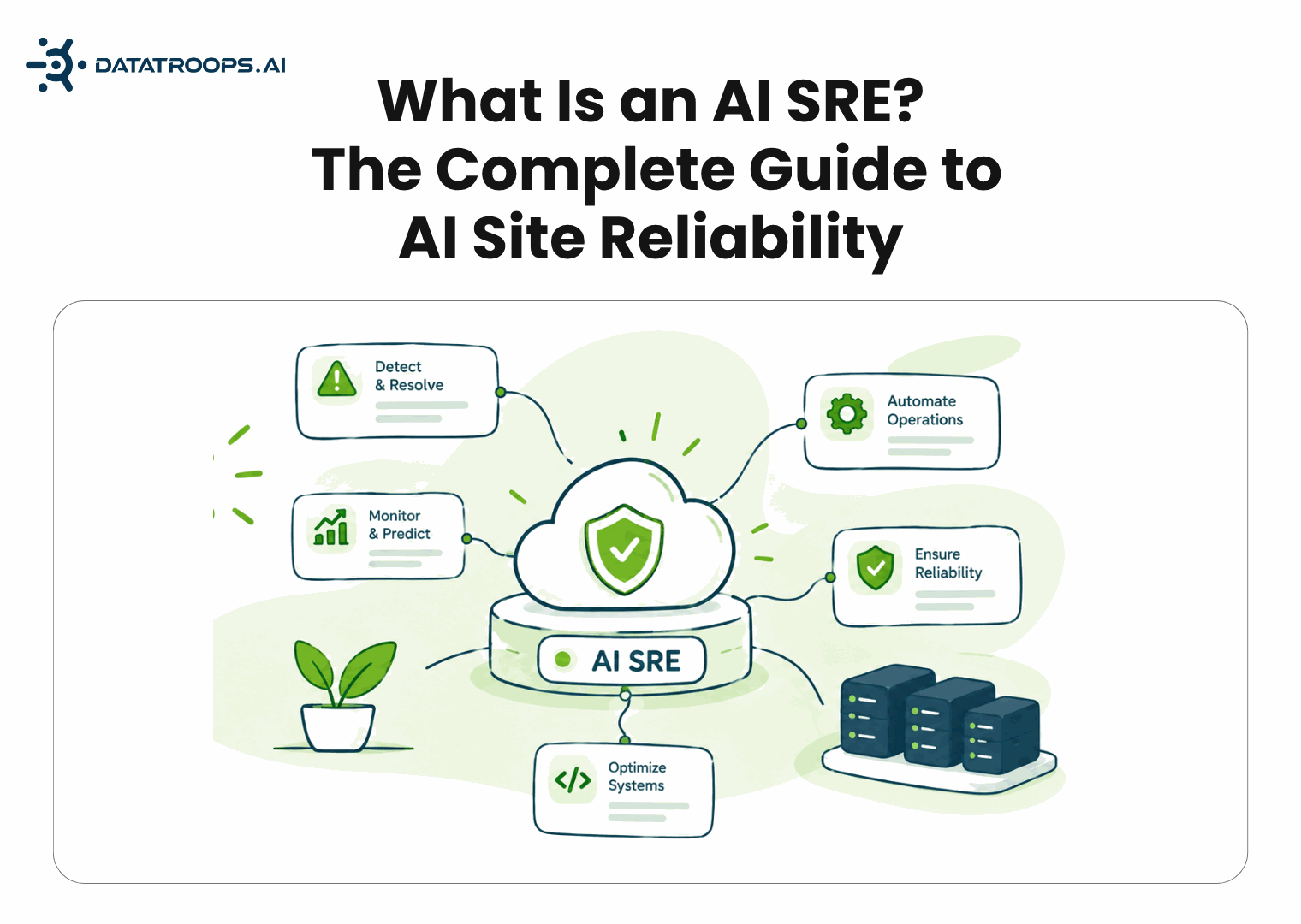
Table of Contents

Share Blueprint
Published Sep 11, 2026

What Is an AI SRE? The Complete Guide to AI Site Reliability Engineering

What Is an AI SRE? The Complete Guide to AI Site Reliability Engineering

What Is an AI SRE? The Complete Guide to AI Site Reliability Engineering

If your production systems have grown faster than your on-call team, you've probably already asked some version of this question: can AI actually run incident response, or is it just another dashboard with a chatbot bolted on?

That's the question behind AI SRE, one of the fastest-moving categories in DevOps right now, and one where the marketing has outpaced the plain-English explanations.

What Does AI SRE Stand For?

AI SRE stands for Artificial Intelligence Site Reliability Engineer. It's an autonomous software agent, usually powered by LLMs, that detects, investigates, and helps resolve production incidents with minimal human hand-holding.
  • Detects issues continuously: watches dashboards and logs around the clock instead of waiting for a human to check in.
  • Investigates automatically: greps logs, pulls metrics, and correlates data the way a human SRE would, just faster.
  • Acts within a policy: recommends a fix or executes one directly, depending on the autonomy your team has approved.

How Is an AI SRE Different from a Chatbot or Copilot?

How Is an AI SRE Different from a Chatbot or Copilot?

How Is an AI SRE Different from a Chatbot or Copilot?

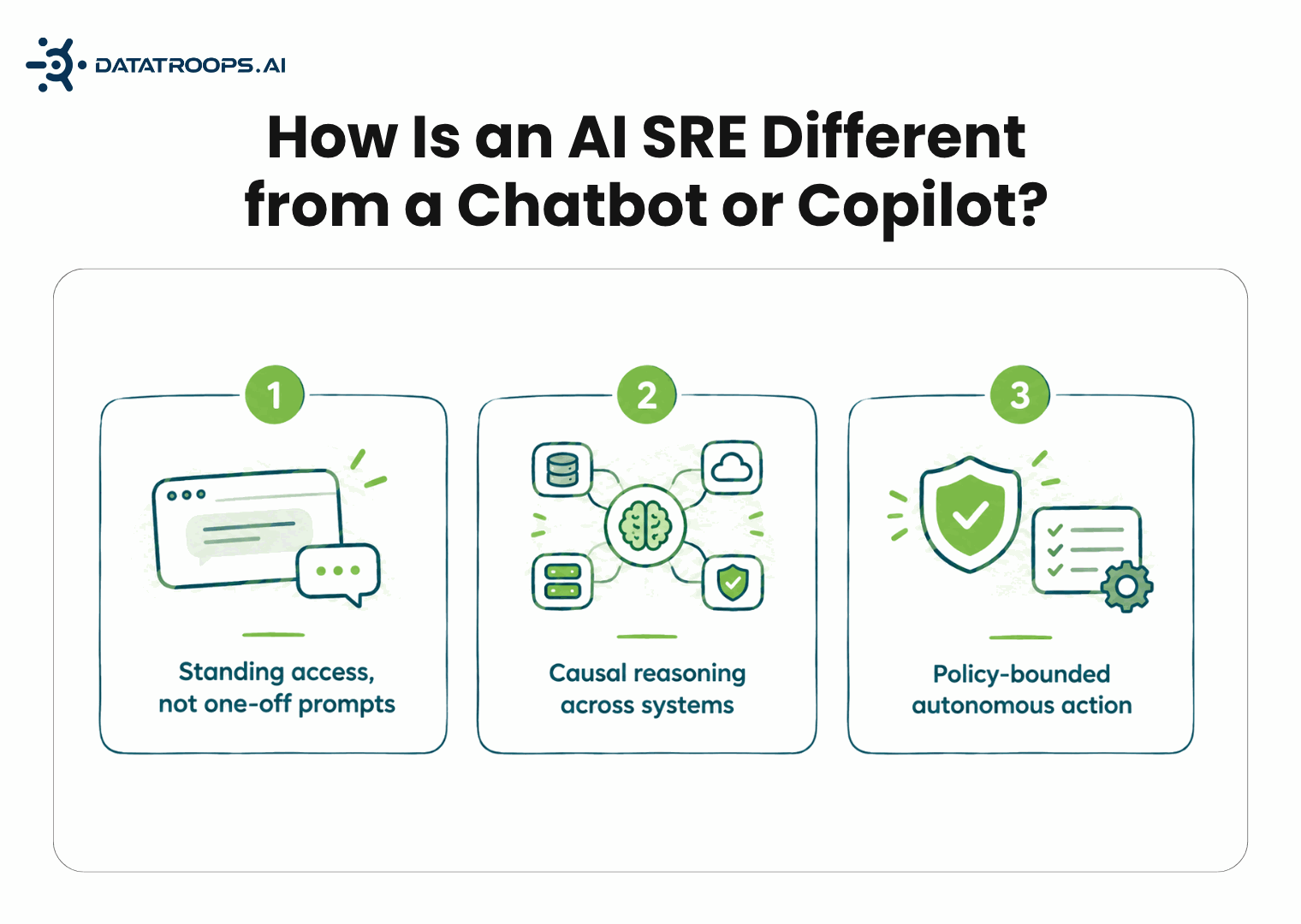
This is the most common misconception in the space. A chatbot answers when asked; an AI SRE acts on its own, pulling live data and taking action without a human typing a prompt first.

  • Standing access, not one-off prompts: it's connected to observability, infra, CI/CD, and incident tools at all times, not just the file you pasted in.
  • Causal reasoning across systems: it links signals from multiple tools together, not just the one dashboard in front of it.
  • Policy-bounded autonomous action: this combination, not just "an LLM with API access," is what actually makes it an AI SRE.

AI SRE vs. AIOps: What's the Difference?

The short answer is scope and autonomy. AIOps is a smarter alert filter; AI SRE is the engineer who picks up the alert and actually works the incident.

FeatureTraditional AIOpsAI SRE
What it doesUses machine learning to spot anomalies and group related alertsUses LLM-based reasoning to investigate, diagnose, and act
Human involvementFlags the issue; a human investigates and fixes itInvestigates and can execute an approved fix itself
ScopeBroad: noise reduction across all IT operationsNarrow and action-oriented, focused on the incident lifecycle
AdaptabilityWorks well on known failure patternsReasons about novel situations it hasn't seen before
  • What it does: AIOps spots anomalies and groups alerts using ML; AI SRE uses LLM reasoning to investigate, diagnose, and act.
  • Human involvement: AIOps flags the issue for a human to fix; AI SRE can investigate and execute an approved fix itself.
  • Scope: AIOps covers broad noise reduction across IT; AI SRE stays narrow and focused on the incident lifecycle.
  • Adaptability: AIOps handles known failure patterns well; AI SRE reasons through novel situations it hasn't seen before.

How Does an AI SRE Actually Work?

How Does an AI SRE Actually Work?

How Does an AI SRE Actually Work?

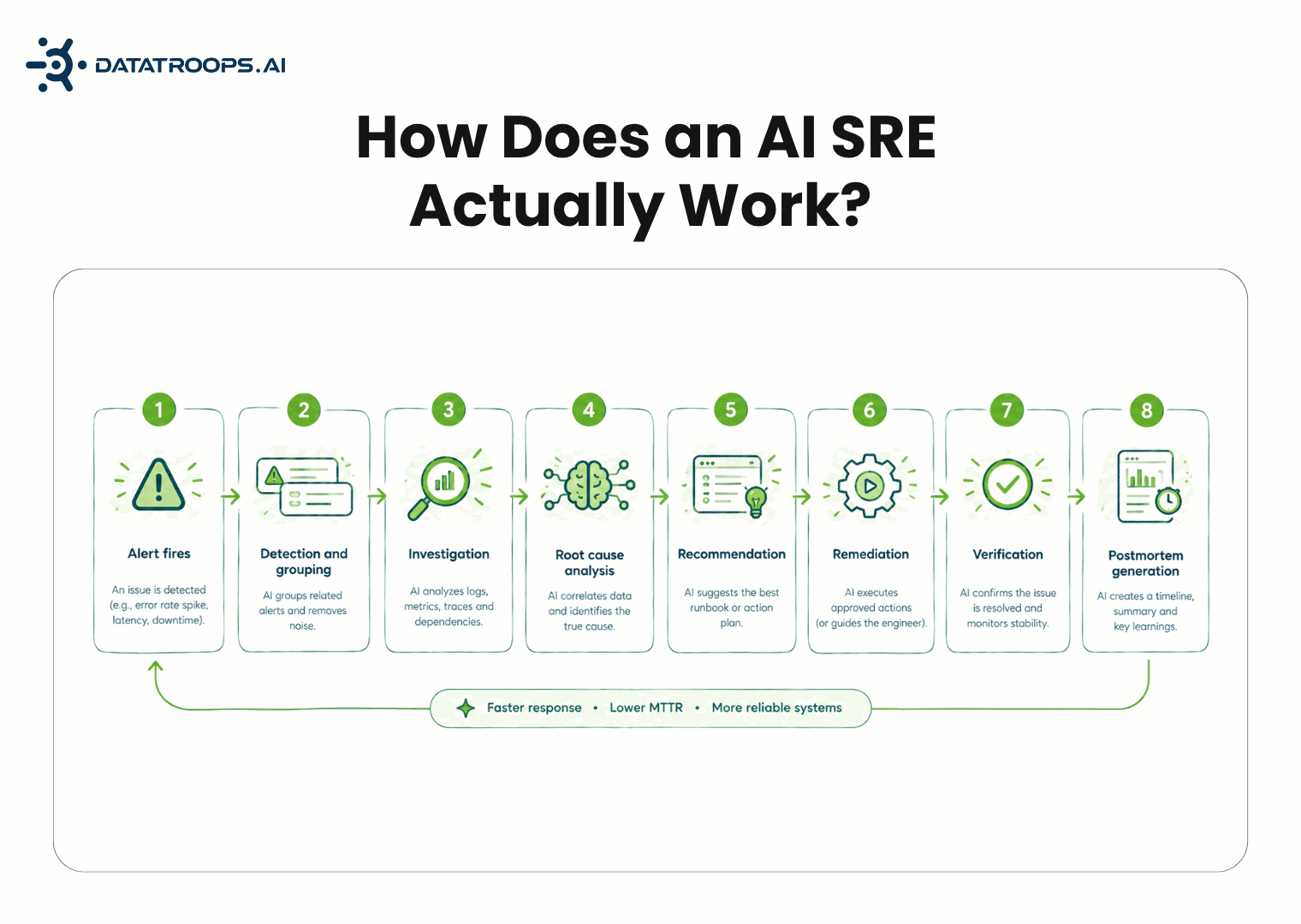
A typical AI SRE workflow moves through eight stages, from the moment an alert fires to a finished postmortem, largely without human intervention at each step.

  • Step 1: Alert Fires: a monitoring system flags a threshold breach, like an error spike or failed health check, and routes it into the pipeline.
  • Step 2: Detection and Grouping: related alerts across services get bundled into one incident instead of paging ten separate fires.
  • Step 3: Investigation: the agent pulls logs, metrics, traces, and recent deploy events, the step that normally eats the most human time.
  • Step 4: Root Cause Analysis: it asks what changed right before symptoms appeared, reasoning about causation instead of just correlation.
  • Step 5: Recommendation: it proposes a specific fix, like a rollback or restart, with a confidence score attached.
  • Step 6: Remediation: it either waits for human approval or executes automatically, depending on your configured policy.
  • Step 7: Verification: it rechecks the original metrics to confirm the fix actually worked, and keeps watching afterward.
  • Step 8: Postmortem Generation: it compiles a timeline of what happened, why, and how it was resolved, without manual write-up.

A Concrete Example

A payment service starts erroring, and instead of 20-30 minutes of manual dashboard-hopping, the agent surfaces the cause and fix in near real time.

  • Diagnosis in seconds: the agent links the error spike to a specific deployment based on timing alone.
  • Recommended fix surfaces fast: a rollback is proposed instead of an engineer guessing across four dashboards.
  • Action gets verified automatically: with permission granted, it rolls back and confirms error rates return to baseline.

What Can Go Wrong With Autonomous Remediation?

Vendor pages tend to skip this, but it's the question engineering leaders actually care about before handing over production access.

  • Misdiagnosis risk: correlation gets mistaken for causation, and a rollback based on a false link can undo a legitimate fix.
  • Compounding actions: an automated fix layered on an already-degraded system can make an incident worse before anyone notices.
  • Auditability gaps: autonomous actions need a clear log of what happened and why, not just a Slack message after the fact.
  • Reverse alert fatigue: over-eager auto-remediation can mask recurring problems that actually need a real code-level fix.

AI SRE Tool Comparison: How the Major Players Differ

Tools in this space differ meaningfully on approval models, integration depth, and how much autonomy they grant out of the box, more than on the category pitch itself.

ToolBest Known ForApproval ModelPrimary Integration Focus
RootlyIncident management plus AI-assisted responseHuman-approved by defaultPagerDuty, Slack, Jira, CI/CD
Resolve.aiEnd-to-end autonomous incident resolutionConfigurable, policy-basedKubernetes, cloud infra, observability
TraversalCausal root cause analysisDiagnosis-first, remediation optionalLogs, metrics, traces, deployment events
ClericAutonomous investigation agentInvestigates independently, escalates with findingsObservability stacks, runbooks
Splunk AI SREEnterprise observability plus AI triageEnterprise governance controlsSplunk's existing observability suite

Evaluating an AI SRE

Choosing an AI SRE means looking past demos and headline metrics to how it actually performs on evidence, transparency, and integration depth.

  • Cross-signal reasoning: the strongest tools connect apps, infra, logs, metrics, traces, and deployments to find real root cause.
  • Transparency into evidence: you should see the signals analyzed, queries run, and hypotheses considered, not just a final answer.
  • Real production testing: performance against actual past incidents matters more than how it looks in a scripted demo.
  • Integration depth over connector count: it should add context inside your existing tools, not just claim a long list of integrations.
  • Security built in from day one: access controls, data protection, and compliance shouldn't be an afterthought.

How Do Teams Roll Out an AI SRE Safely?

Most successful rollouts follow a three-stage progression rather than granting full autonomy on day one, building trust before handing over control.

  • Shadow mode: the agent investigates and diagnoses alongside the on-call engineer but takes no action, building trust in its accuracy.
  • Suggest-only mode: it recommends a fix with a confidence score, and a human approves or rejects it before anything runs.
  • Scoped auto-remediation: it acts independently only on low-risk, well-understood failures, escalating anything ambiguous to a human.

Will AI Replace SRE Engineers?

Not in the near term, and most vendors are explicit about that. AI SRE absorbs the repetitive, machine-scale work; not the judgment calls that still need a human.

  • Handles the repetitive work: correlating log lines, checking dashboards, and writing postmortems get automated away.
  • Leaves the judgment calls to humans: deciding on a risky rollback or redesigning brittle architecture still needs a person.
  • Shifts, not shrinks, the role: expect fewer 3 a.m. pages for known failures and more time on novel incidents and system design.

How DataTroops Approaches AI SRE

DataTroops builds AI SRE agents that run entirely inside your infrastructure - reading logs, correlating deploys and finding root cause in minutes, with systems engineers handling the edge cases. A few things shape how it's built:

  • A staged path with an exit at every stage: It starts with a fixed-price Production Health Assessment Report (2–3 weeks, read-only access, real numbers from your own systems) moves to an Incident Automation Pilot on your top 2-3 incident patterns with success criteria agreed in writing before anything is built, and - only if the numbers hold up - scales into Managed AI Production Support. You can stop after any stage.
  • Built for the hard stack: The team behind DataTroops has spent years operating JVM, Kafka, Scala, and Rust systems in trading platforms and payment infrastructure - the systems generic tools stall on.
  • A managed service, not another tool to run: DataTroops runs the agents, tunes the agents, and answers the escalations. The ~25% of incidents that actually need a human escalate to a pod of systems engineers.

Conclusion

An AI SRE is best understood as an autonomous teammate for incident response, one that reasons across your systems and acts within whatever boundaries you set.

  • The category is still young: vendor claims are ahead of standardized benchmarks, so proof-of-concepts matter more than pitch decks.
  • A staged rollout is the safest path: shadow mode, then suggestions, then narrowly scoped autonomy, in that order.
  • The payoff is real when done right: teams get the MTTR gains without the surprise of an agent "fixing" something that wasn't broken.

Want an AI SRE built for your production stack?

Connect with our team of systems engineers to evaluate, pilot, and deploy autonomous AI SRE agents safely in your infrastructure.

Frequently Asked Questions

Key takeaways and architectural details Settled for engineers and team leads.

No. AIOps groups and filters alerts using ML, while AI SRE investigates, diagnoses, and can act on incidents using LLM-based reasoning.

Yes. It needs standing access to observability, infra, CI/CD, and incident tools to reason causally, not just a pasted log file.

Only if you configure it to. Most teams start in suggest-only mode and grant scoped auto-remediation later, for low-risk failures only.

A false correlation can trigger an incorrect fix, which is why auditability, confidence scores, and staged rollouts matter before granting autonomy.

Not in the near term. It absorbs repetitive investigation and reporting work, while judgment calls and architecture decisions stay with humans.

Most teams spend several months in shadow and suggest-only modes before enabling any scoped auto-remediation.

It depends on your stack and risk tolerance. Compare approval models and integration depth rather than picking on category hype alone.

Ready to Automate Production SRE?

Deploy autonomous agents inside your environment to investigate alerts, diagnose incidents, and generate verified fixes.